

The Payment Gateway
Your WHMCS Deserves
Accept one-time and recurring subscription payments through 30+ global payment providers, all from a single, free WHMCS module with zero code changes.

Real Checkout Experience
What Your Clients See at Checkout
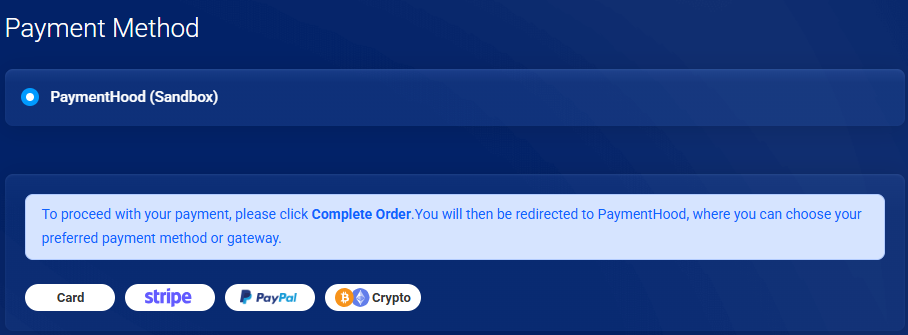
PaymentHood integrates directly into the WHMCS checkout flow, so clients stay on your site and pay through their preferred provider without any redirects or friction.
One-Time & Subscription Payments
WHMCS generates both one-off invoices and recurring renewal invoices. PaymentHood handles both billing models through the same module. No extra configuration, no second gateway.
One-Time Payments
Process a single charge when clients pay a WHMCS invoice. They select PaymentHood at checkout and pay through your active provider. The transaction completes immediately and the invoice is marked paid automatically.
- Pay any open WHMCS invoice in one step
- Works with all 30+ payment providers
- Instant confirmation via secure provider callback
- Invoice marked paid in WHMCS automatically
- Charges in the invoice currency, multi-currency ready
Subscription & Recurring
Enable automatic recurring billing for any WHMCS product or service with a recurring cycle. PaymentHood creates a subscription agreement with the provider so your clients are charged automatically on their billing cycle, with no manual follow-up needed.
- Renewal invoices charged automatically
- Subscription agreement created securely at the provider
- Supports every WHMCS billing cycle: monthly, annual, custom
- Failed payments follow your WHMCS retry rules
- Cancellations synced back to the provider
Everything Your WHMCS Store Needs
One module connects your store to a world of payment options, with full native WHMCS compatibility.
Native WHMCS Integration
Registered as a standard WHMCS payment gateway that works seamlessly with your existing checkout flow.
30+ Global Providers
Connect PayPal, Stripe, Authorize.net, Adyen, Braintree, and many more, all through a single PaymentHood account.
Automatic Order Management
WHMCS order statuses update automatically on payment success or failure. No manual order handling required.
Sandbox & Live Modes
Test your full checkout flow in sandbox mode before going live. Switch environments with a single toggle in the admin.
Upload & Activate: That's It
Install the module, paste your PaymentHood API key, and you're ready to accept payments. No code, no webhooks.
Centralized Provider Dashboard
Manage provider credentials, view transactions, and configure settings from your PaymentHood account.
Up and Running in 5 Minutes
Three simple steps from download to accepting live payments on your WHMCS.
Download the Module
Grab the latest release from GitHub. It's a standard WHMCS module package: no build steps, no dependencies.
Install & Enable in WHMCS
Go to Apps & Integrations, upload the package, then enable the PaymentHood module, and it appears in your WHMCS payment methods.
Connect Your PaymentHood Account
Paste your PaymentHood API key in the module settings, choose sandbox or live mode, and save. Your store is now ready to accept payments.
Supported Providers
Supported Payment & Gateways Provider
Connect any of these globally trusted providers to your WHMCS store through a single PaymentHood integration.












Set up a provider on WHMCS
Each guide covers the payment methods, currencies and setup steps for that provider on WHMCS.
Why WHMCS Stores Choose PaymentHood
One module with real flexibility: no per-provider installs, no transaction fees, no lock-in.
One Module, Any Provider
Other solutions require a separate module for each payment gateway. PaymentHood gives you all 30+ providers through one unified WHMCS module.
No Module Cost
The module is free, and so is every payment feature. PaymentHood takes no percentage and no per-transaction cut; you pay only the processing fees set by your chosen gateway. An optional Premium plan adds white-label checkout branding.
Sell to Any Market
Reach customers globally by activating region-specific providers like Tap (Middle East), Oxapay (crypto), or PayTabs, without changing your WHMCS setup.
No Code Required
Works out of the box with any standard WHMCS installation. No custom development, no webhook setup, no API coding on your end.
WHMCS-Native Behaviour
Orders, statuses, emails, and refunds all flow through WHMCS as expected; customers and admins see no difference in the checkout experience.
Switch Providers Anytime
Change your active payment provider from your PaymentHood dashboard without touching WHMCS. No module changes, no reinstallation.
One-Time vs. Subscription at a Glance
| Feature | One-Time Payment | Subscription |
|---|---|---|
| Charge frequency | Single charge | Monthly / Annual / Custom |
| Auto-renew | ✗ Manual | ✓ Automatic |
| WHMCS invoice trigger | Clients pay open invoice | System-generated renewal invoice |
| Provider agreement | Not required | Subscription created at provider |
| Cancellation | N/A | ✓ Synced to provider |
| Best for | Single invoices & one-off orders | Products with recurring billing cycles |
| Supported providers | ✓ All 30+ providers | ✓ All 30+ providers |