


A payment integration is the connection between your checkout and a payment provider: the code and configuration that sends a charge, reads the provider’s answer, and keeps your own records in step with the money that actually moved.
Most guides describe a payment integration as an API call with a secret key. The API call is real, and it is the smallest part. The work that decides whether the integration holds up is everything around it: what happens when the answer never arrives, who is allowed to see a card number, and how you find out tomorrow that yesterday’s totals do not match.
Before any of that, there is one decision that sets the shape of the whole project, and it is not which provider you pick.
The decision that comes first
The first question is where the card details are entered. That single choice decides three things at once: how much compliance obligation you take on, how much of the checkout experience you control, and how long the build runs. There are four practical answers, and they are not equally sized.
The four ways to connect
1. A provider-hosted payment page
The customer clicks pay, leaves your site for a page the provider serves, enters their card there, and returns to you with a result.
Card data never touches your infrastructure, which keeps your compliance obligation at its smallest. It is also the shortest build: often a form post out and a return URL back.
What you give up is the look and the speed of the payment step, which now belongs to someone else. And the return trip is where most of the real bugs live. A browser redirect can be forged by anyone who reads the URL, dropped when the customer closes the tab, or fired twice. Treat it as a hint that something happened, never as proof, and confirm the result from your server before you release anything.
2. Embedded fields served in an iframe
The card form appears inside your own checkout, but each input is an iframe served by the provider. Your page renders it; your page never receives what is typed into it.
This is the middle path, and for most stores it is the right one. The checkout looks like your site, conversion does not suffer a redirect, and the card data still never reaches your server.
The cost is front-end work: styling fields you do not own, validation and error states that come back asynchronously, mobile keyboard behaviour, and one more third-party script sitting in the critical path of your highest-value page.
3. Direct API, server to server
Your server receives the card number and sends it on to the provider.
You get complete control of the experience. In exchange, your entire server environment becomes part of the environment that handles cardholder data, and that is a different order of obligation from the two options above: not a longer questionnaire but a different one, with scanning and controls attached.
Very few businesses need this. Choose it only when a genuine product requirement cannot be met any other way, and price in the ongoing cost rather than the build.
4. A platform plugin
If your store runs on an established platform, the integration is an install and a pair of API keys. Somebody has already made the choice above on your behalf, almost always hosted or embedded, and has handled the callback plumbing.
This is the cheapest route by a wide margin, and the limit is what the plugin chooses to expose. The other limit is arithmetic: the usual model is one plugin per provider, so the second provider is a second install, a second set of credentials and a second reconciliation habit. Free plugins for the major carts and billing systems are worth checking before you plan any build at all.
How the choice changes your compliance scope
| Method | Card data reaches your server | Front-end work | Typical build |
|---|---|---|---|
| Hosted page | No | Minimal | Days |
| Embedded fields | No | Moderate | Days to weeks |
| Direct API | Yes | High | Weeks, plus ongoing programme |
| Platform plugin | No | None | Under an hour |
The column that matters most is the first one. Whether card data touches your server is what separates a short annual questionnaire from a compliance programme with a dedicated owner, and the full version of that reasoning is in do you need PCI compliance to accept card payments.
What actually takes the time
Teams estimate a payment integration by the charge call, which is why the estimate is usually wrong. The charge call works on the first afternoon. The schedule is spent on the paths nobody demos:
- The answer that never arrives. A request times out. You do not know whether the customer was charged. Deciding what your system does in that moment, and making a repeat request return the original result rather than creating a second charge, is the single most expensive thing to add late.
- Callback verification. Every provider signs its notifications differently, and getting the signature check wrong means anyone can tell you a payment succeeded.
- The pending state. A payment that is neither confirmed nor failed is a real state, and your order model probably does not have a place for it yet.
- Refunds, partial refunds and disputes, each with their own notification and their own effect on your records.
- Declines you cannot produce on demand. Test cards cover a handful; the ones that matter in production are the ones you never saw in sandbox.
A concrete list of what to verify before going live, rather than after, is the payment integration launch checklist.
What remains once the first charge works
A working charge is the beginning of the integration, not the end of it. The recurring jobs that sit behind it, and roughly when each one starts to matter, are set out in what the payment layer of a product has to do.
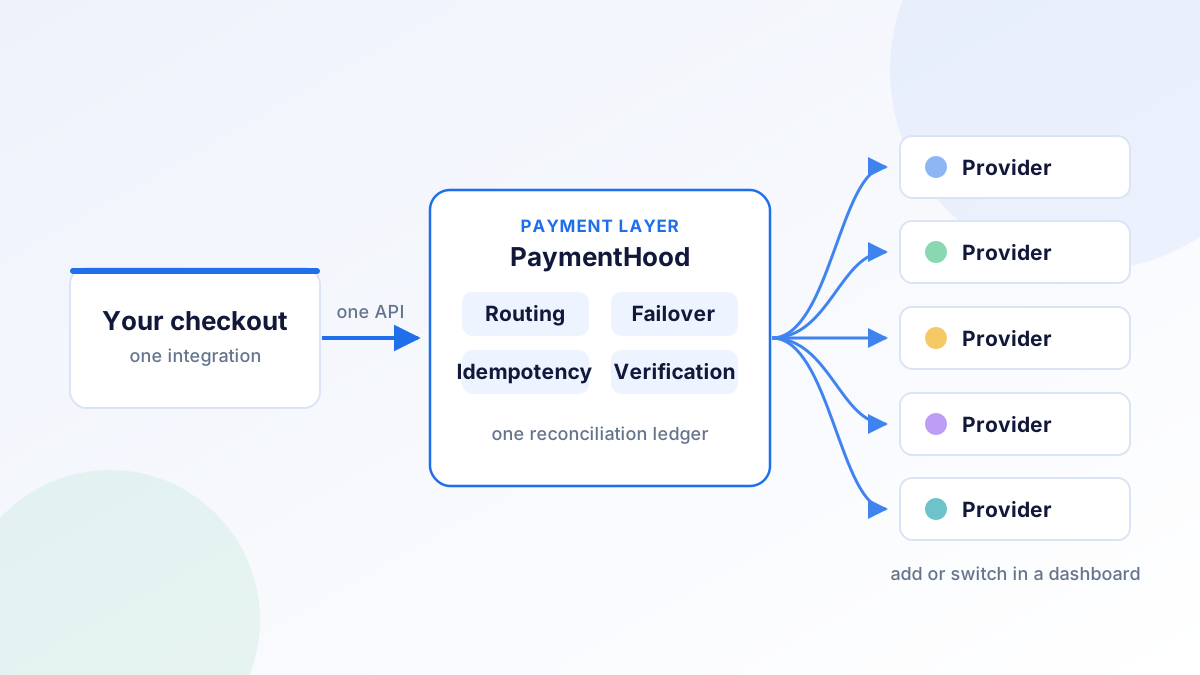
The pattern worth knowing early is that all of those jobs are per-provider. The first integration is a project. The second one is the same project again, with a different SDK, different callback format and different error codes, plus the new problem of deciding which provider handles a given payment. That is the point at which teams start reading about payment orchestration, which exists to make the second and third providers cost far less than the first.
Frequently asked questions
What is a payment integration? It is the connection between your checkout and a payment provider: the code and configuration that creates a charge, reads the result, receives the provider’s notifications and keeps your records matching the money. It usually also covers refunds, retries and the states a payment can sit in before it is final.
What is the difference between a payment gateway and a payment integration? A payment gateway is the service that moves the transaction to a processor. The integration is your connection to it. One gateway can be integrated in several different ways, and the way you choose changes your compliance scope and your build time more than the choice of gateway does.
How long does a payment integration take? A platform plugin takes under an hour. A hosted payment page is usually a few days. Embedded fields run to a few weeks once styling, error states and callback handling are done properly. A direct API integration is longer, and carries a compliance programme that does not end at launch.
Do I need PCI compliance for a payment integration? Everyone accepting cards has an obligation, but its size depends on this choice. If card data never reaches your server, the obligation is normally a short questionnaire. If your server handles card numbers, it is a substantially larger exercise.
Where PaymentHood fits
PaymentHood is one integration that connects you to many providers rather than one. Card entry stays off your servers, the callback verification and server-side confirmation are handled once instead of once per provider, and adding a second provider is a change in a dashboard rather than another project. Every provider account stays contracted in your own name, and there is no per-transaction fee from PaymentHood.
Create a free PaymentHood account, or browse the provider directory to see what you would be able to connect.