

The Payment Gateway
Your WHMCS Deserves
Accept one-time invoices and recurring subscriptions through 15+ global payment providers — all from a single, free WHMCS module with zero code changes.

PaymentHood × WHMCS
Real Checkout Experience
What Your Clients See at Checkout
PaymentHood integrates directly into the WHMCS checkout flow — clients stay on your site and pay through their preferred provider without any redirects or friction.
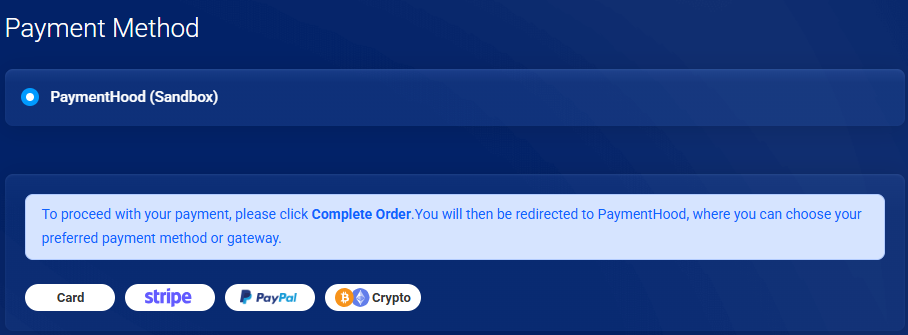
Flexible Billing
One-Time & Subscription Payments
WHMCS hosts sell both domain/hosting bundles and recurring managed services. PaymentHood handles both billing models seamlessly.
One-Time Payments
Process a single charge when a client pays a WHMCS invoice. Ideal for setup fees, domain registrations, one-off services, and manual orders. The transaction completes immediately and the invoice is marked paid automatically.
- Domain registration & renewal payments
- SSL certificate purchases
- Server setup & migration fees
- Custom development & design invoices
- Add-on service purchases
Subscription & Recurring
Enable automatic recurring billing for hosting plans, reseller accounts, VPS, and managed services. PaymentHood creates a subscription agreement with the provider so your clients are charged automatically on their billing cycle — no manual follow-up needed.
- Shared, reseller & VPS hosting plans
- Dedicated server monthly billing
- Managed WordPress & Magento hosting
- SaaS products sold through WHMCS
- Maintenance retainer packages
Everything You Need
Built for Serious WHMCS Operators
Every feature was designed with WHMCS hosting companies and service providers in mind.
Drop-In WHMCS Integration
Upload the module, activate from Apps & Integrations, sign in with Google — done. No API keys to hunt for, no webhook config, no code edits.
15+ Payment Providers
Switch between PayPal, Stripe, Authorize.net, Adyen, Braintree, PayTabs, Tap, Oxapay and more from a single dashboard without reinstalling anything.
Automatic App Provisioning
After sign-up, PaymentHood automatically creates your sandbox and live apps. No manual configuration screens — your gateway is ready immediately.
Smart Invoice Automation
Paid invoices are captured and marked automatically in WHMCS. Subscription renewals trigger without any admin action, keeping your billing cycle clean.
Built-In Sandbox Mode
Test your entire checkout and subscription flow with a dedicated sandbox app before going live — no risk, no real charges, no separate test account setup.
Unified Payment Dashboard
See all transactions, subscription statuses, and provider performance from one PaymentHood console — regardless of which gateway processed the payment.
Multi-Currency Ready
Accept payments in the currencies your clients prefer. PaymentHood passes the invoice currency to the selected provider transparently.
PCI-Compliant Checkout
Payment data never touches your server. Clients are taken to the provider's hosted page, so your WHMCS install stays outside PCI scope.
Open Source & Free Forever
The module is MIT-licensed on GitHub. Inspect the code, fork it, contribute — no licensing fees, no hidden charges, no vendor lock-in.
Getting Started
From Download to Live in 5 Steps
Download Module
Grab the free ZIP from GitHub releases — always the latest stable version.
Upload to WHMCS
Extract and copy the files to your WHMCS /modules/gateways/ directory via FTP or cPanel.
Activate Gateway
Go to Apps & Integrations in your WHMCS admin and search for PaymentHood.
Sign In with Google
One-click sign-up with your Google account. PaymentHood creates your apps automatically.
Start Accepting Payments
Your gateway is live. Clients can pay invoices and subscribe to plans right away.
Global Coverage
15+ Providers. One Module.
Connect to the world's leading payment gateways without writing a single line of code. Switch providers in seconds from your PaymentHood dashboard.












Why PaymentHood
What WHMCS Operators Actually Care About
No Downtime During Switch
Change your active payment provider from the PaymentHood dashboard while WHMCS keeps running. Clients never see an interruption.
No Stored Card Data
PaymentHood never stores raw card numbers. All tokenisation is handled by the provider's vault, keeping your WHMCS PCI-safe.
Subscription Cancellations Sync
When a client cancels their service in WHMCS, the subscription at the payment provider is also cancelled — no orphaned billing cycles.
Version-Controlled & Auditable
Every change to the module is tracked on GitHub with full commit history. Your security team can audit the code at any time.
No Extra WHMCS Hooks
PaymentHood uses only the standard WHMCS gateway API. No custom hooks, no database patches, no risk of breaking other modules.
Dedicated Support Channel
Hit a problem? Open an issue on GitHub or reach our support team directly. We respond fast — because slow payment support costs you money.
Side by Side
One-Time vs. Subscription — at a Glance
| Feature | One-Time Payment | Subscription |
|---|---|---|
| Charge frequency | Single charge | Monthly / Annual / Custom |
| Auto-renew | ✗ Manual | ✓ Automatic |
| WHMCS invoice trigger | Client pays open invoice | System-generated renewal invoice |
| Provider agreement | Not required | Subscription created at provider |
| Client cancellation | N/A | ✓ Synced to provider |
| Best for | Domains, SSL, setup fees | Hosting, VPS, managed services |
| Supported providers | ✓ All 15+ providers | ✓ All 15+ providers |
Common Questions